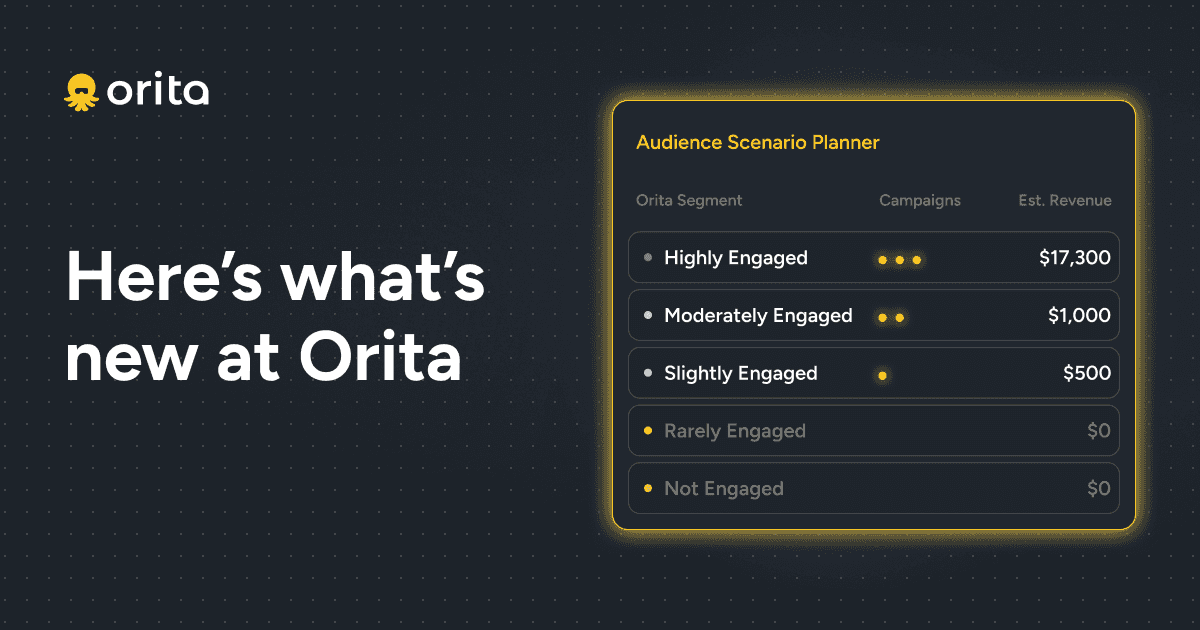
Audience Scenario Planner
Strategize your sending to track towards your retention goals.
The Scenario Planner gives you the flexibility to determine - based on send frequency decisions - what revenue and click rates you should expect by including each Orita Engagement Level audience.
The data is built on Shopify Placed Order (or Big Commerce) Last 30 day baseline data from your Orita Engagement levels, including:
Number of people in each Engagement level
Coverage percentage - What proportion of each level you’ve actually reached in the last 30 days, accounting for exclusions
Historical performance metrics:
Click rates
Order/conversion rates
Average Order Value (AOV)
Revenue Per Recipient (RPR)
Revenue attribution - Understanding what percentage of total revenue comes from email, and specifically from campaigns
Considerations: Because this is based on your Last 30 days, your projections may vary - e.g. a big sale/launch will inflate your numbers.
Understanding the Scenario Planner
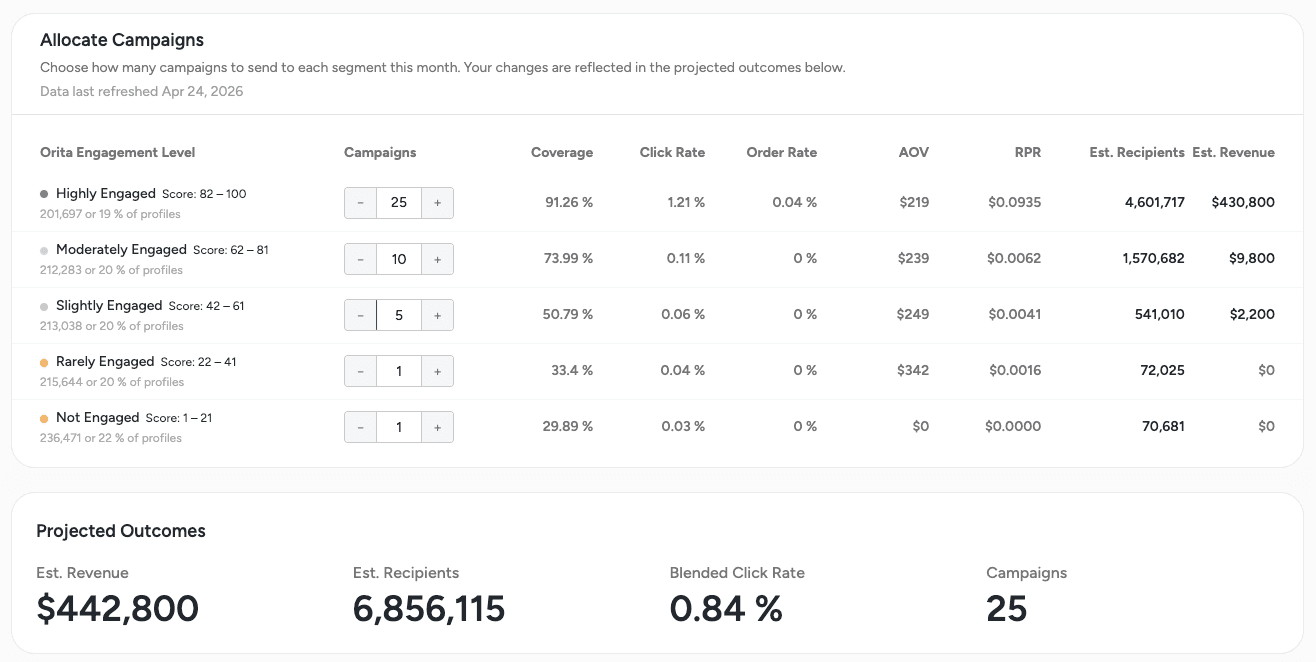
If you sent one campaign and hit every Engagement Level, you gain insights on the estimated revenue from each Engagement Segment.
In this example, note the Highly Engaged audience drives 92% of the revenue - your data will vary.
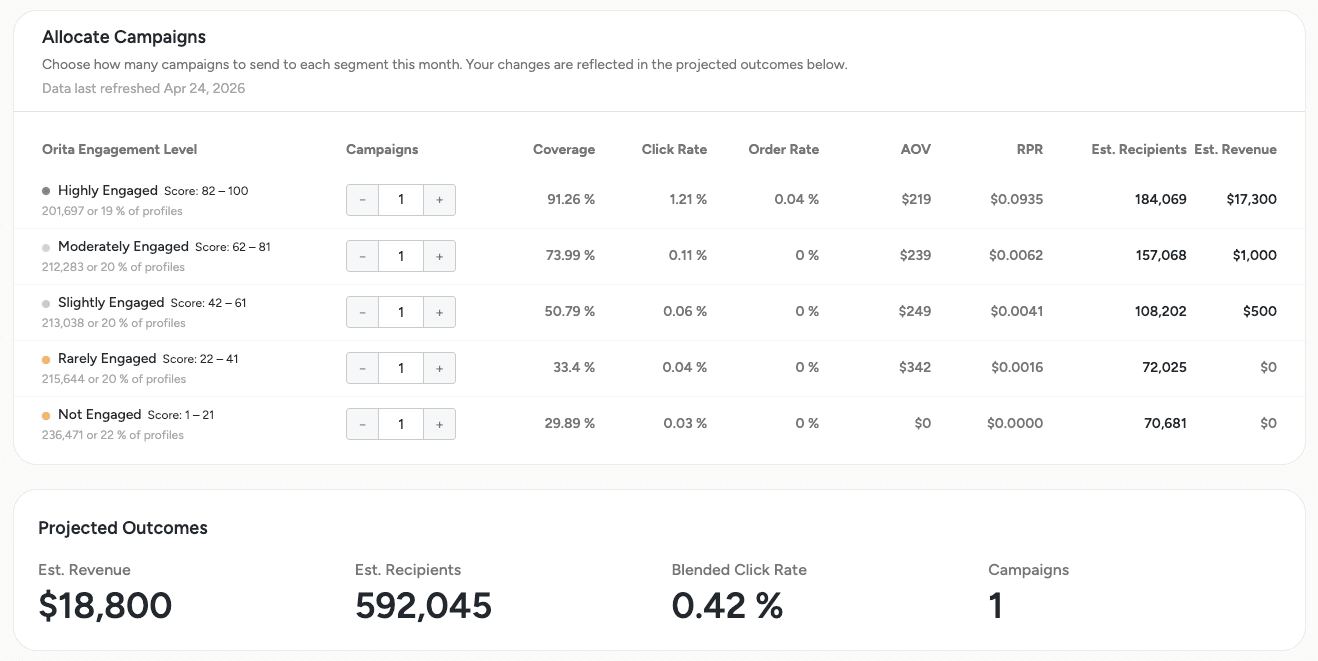
Using the Scenario Planner For this brand, they can send a campaign almost every day to Highly Engaged, 10 times to Moderately Engaged and 5 times to Slightly Engaged. Adding Rarely and Not Engaged would not expect to drive any notable revenue.
The blended click rate of this monthly plan is projected to be 0.84% - which is healthy enough for this brand to be comfortable with this sending strategy.
If your click rate is sub 0.5%, you will benefit most from sending one more campaign to the Highly Engaged audience, and not reach deeper into your lower Engagement Levels.
Strategizing Send Cadence With Orita Engagement Levels
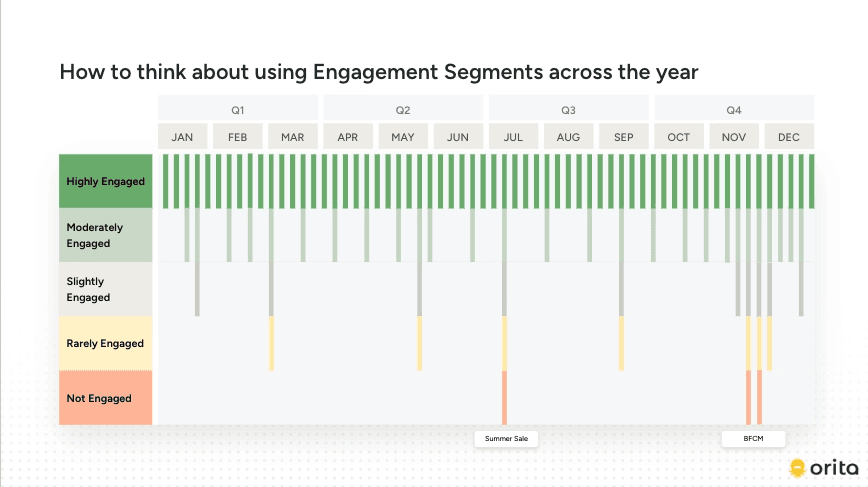
Keep in mind that engagement across each level is unique to every brand. In general, think about segmentation this way:
Highly Engaged: These are your profiles showing the highest likelihood of engaging with an email today. Send almost every campaign to this group for the strongest click rate and revenue lift. They are also the least likely to take negative actions (unsubscribe/spam).
Recommended content & messaging: Beyond standard campaigns, consider VIP-focused content like early access or exclusive drops for your highest-value customers. Use this segment for resending past campaigns or final sale pushes.
Moderately Engaged: Generally it is a good idea to include this segment in at least 25-50% of your campaign sends. They’re not your most active profiles, but for most brands they’re showing enough consistent signal that sending regularly should minimally impact deliverability. If you’re focused on increasing your click rate, this segment may slow your progress some.
Recommended content & messaging: In addition to evergreen content, focus on targeting moderately engaged groups with more relevant product categories, content, or incentives that lean into urgency or further product discovery. Avoid oversending if this group doesn’t produce a strong click rate, but maintain enough at-bats to capture conversion opportunities.
Slightly Engaged: Here is where you start to make judgment calls. These profiles have some intent signal, but it’s weak or infrequent. Including them in every send will drag down your engagement rates and will contribute significantly lower revenue than your top segments. Best suited for occasional sends.
Recommended content & messaging: Focus on high-relevance campaign moments such as product launches, major promotions, or very relevant category/product highlights.
Rarely Engaged: Treat with caution. These profiles have shown very little interest and sending to them regularly will often hurt deliverability more than it helps revenue.
Recommended content & messaging: Reserve sends for major brand moments or strong promos. Ongoing engagement is likely better driven through other channels.
Not Engaged: The riskiest group to send to and generally not recommended. Sending here is likely to generate unsubscribes, spam complaints, and inbox placement issues.
Recommended content & messaging: Reserve for peak sale periods (BFCM or similar).
How does Grow factor into this?
The Orita Grow segment is comprised of profiles showing the highest propensity to purchase if an email is received. It spans all Engagement levels, pulling in any profile where an email is statistically most likely to cause conversion. This is helpful in grabbing those lower-engagement profiles who are most likely ready-to-buy, without having to reach the entire engagement segment.
It is why we recommend including Orita Grow in ALL of your campaign sends, regardless of your Scenario Planner mockup. The Grow audience will provide strong deliverability and incremental revenue.
What about my other segments?
Because Orita’s engagement levels are mutually exclusive, this Scenario Planner projects outcomes based only on the segments you’ve selected. Any additional segments you include in a send aren’t factored into these calculations.
For example, a segment like “180D Engaged” will likely pull in profiles that Orita would classify as Slightly or Rarely Engaged. When those profiles are included in your actual send, your real results in Klaviyo may diverge from what the Scenario Planner projected if you had only planned to send to Highly and Moderately Engaged. This can dilute click rates and revenue lift relative to the projection.
As a general rule: the closer your additional segments map to Orita’s engagement tiers, the more accurate your projected vs. actual results will be.